Princess Baby Phone Game
- 4.1
- Rating
- 10.00M
- Installs
- Free
- Price
 Analysis by App-foxy
I approached Princess Baby Phone as a small, playful learning game rather than a substitute for a real phone or a full early-years curriculum. Its idea is easy to understand: children explore a pretend phone and move between activities designed to mix simple play with basic learning. That focused concept makes it approachable, especially when a child wants something familiar-looking to tap and explore without the pressure of a conventional lesson.
After spending time with it, my overall impression is that the game works best in short, supervised sessions. The princess theme and toy-phone format give it an inviting starting point, while the range of activities helps prevent the experience from feeling like one repeated interaction. I would recommend it to families looking for a free, gentle educational distraction for a young child, but I would not present it as a complete learning plan or as an app that will suit every child equally well.
How the toy-phone design affects everyday use
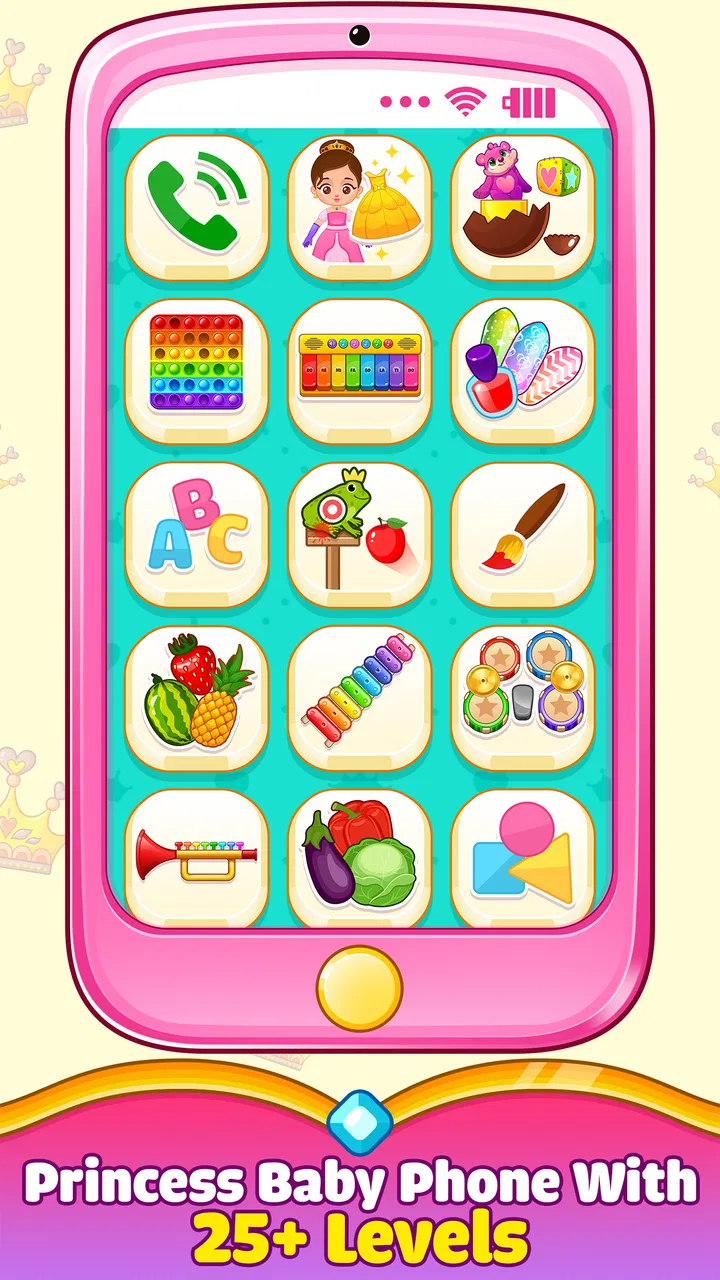
The most useful design choice is the familiar phone metaphor. A child does not need to understand a complicated menu before getting started; the device-like presentation gives the experience an obvious purpose. In my view, that matters for children who are more willing to investigate something that resembles an object they see adults using every day. The pretend-phone framing can also make a first session feel like imaginative play instead of formal screen time.
You May Also Like

 Blood Strike: 2.5 Anniversary
Blood Strike’s Loadouts Turn Every Drop Into a Tactical Gamble
A close look at Blood Strike’s custom loadouts: how fast access to signature weapons reshapes its battle royale rhythm, rewards preparation, and narrows the gap between fights.

 Pandora - Music & Podcasts
Pandora’s Music Is Easy to Start, but Harder to Recover
Pandora’s strength is its low-effort path from a seed to a station. Its weak spot is how much confidence it asks you to place in connection, setup, and quiet recovery.

 8 Ball Pool
 Is Built on Rivalries, Rematches, and Routine
A close look at the rivalries, rematches, shared routines, and unanswered safety questions that turn a quick pool match into a persistent mobile community.

 Samsung Music
’s Quiet Strength Is Playing What You Already Own
Its reach comes less from spectacle than from dependable access to a personal library. That simplicity is both the app’s strongest retention engine and its ceiling.

 AccuWeather: Weather Radar
AccuWeather Review: A Quick, Clear Forecast for Everyday Decisions
For everyday plans, the best forecast is the one you can understand quickly. AccuWeather makes rain timing, radar, and local conditions easy to act on, with a few trade-offs.

 Hill Climb Racing
Why Hill Climb Racing Still Turns Crashes Into One More Run
A tiny car, a bumpy hill and one more upgrade: Hill Climb Racing keeps resurfacing because its simple chaos makes every near-miss feel personal.
More From Our News Desk



Navigation is easiest when an adult introduces the game once and stays nearby at the beginning. Young children may recognize that the screen contains several choices, but recognizing what each choice does is a different skill. I found it more practical to let the child choose freely after a brief demonstration rather than expecting independent exploration immediately. This approach also makes it easier to notice which activities hold attention and which ones create confusion.
Readability depends on the child’s visual comfort and familiarity with touchscreens. Large, recognizable illustrations are generally more approachable than dense written instructions, particularly for children who are not yet reading. At the same time, a colorful princess-themed interface can place visual emphasis on decoration as well as function. If a child has difficulty separating foreground elements from background artwork, an adult may need to point out the active choice instead of assuming that the most noticeable image is the correct one.
The strongest accessibility benefit is the low language barrier at the point of entry. A child can often understand the pretend-phone idea through pictures and actions before understanding every word. That does not make the game language-free, though. Spoken prompts, labels, or learning tasks may still matter depending on the activity, so it is better suited to shared play when a child is developing language or is using a device in a second language.
Supporting different reading and attention levels
I would use this game differently with a preschooler who is still learning to follow directions than with a child who can read short prompts independently. For the younger player, I would keep the session centered on one activity at a time and describe the next action in plain language. For a more confident reader, I would step back and allow more experimentation, checking in only when the child becomes stuck.
This makes Princess Baby Phone more flexible than its simple appearance might suggest, but the flexibility comes from the adult’s approach rather than from a clearly graduated teaching system. It does not replace an app built around carefully sequenced reading, numeracy, or developmental goals. Families seeking measurable progression should look elsewhere. Families seeking a friendly starting point for shared exploration may find the lighter structure more comfortable.
The game is also more manageable when the phone is held or placed at a stable angle. A child who is still developing precise touch control may accidentally select neighboring choices if the device is moving around. I found that a table or another steady surface can turn a frustrating interaction into a successful one. This is a small practical detail, but it has a noticeable effect on whether the child feels capable.
Motor control, sound, and sensory comfort
Touch interaction can be a strength for children who enjoy direct cause and effect: tap something, see a response, then decide what to do next. It can be less comfortable for children with limited fine-motor control, tremors, reduced coordination, or difficulty judging where a target begins and ends. The toy-phone concept does not automatically solve those issues. A child may still need help aiming, holding the device, or recovering after an unintended tap.
For that reason, I would avoid treating independent operation as the only measure of success. A child can participate meaningfully by choosing between two options while an adult handles the more precise touches. This shared method keeps the learning and pretend play intact without turning motor difficulty into a reason to abandon the game. It is also useful for children who become discouraged quickly after a mistake.
Sensory preferences deserve equal attention. Bright colors and animated responses can make the activities engaging, but the same qualities may be tiring for children who are sensitive to visual movement or strong contrast. I would begin with a short session in a calm room, keeping the screen brightness comfortable and watching the child’s behavior rather than assuming that enthusiasm means the experience is comfortable. Looking away, rubbing the eyes, becoming restless, or repeatedly leaving the activity can be signs that a break is more helpful than another prompt.
Sound can create a similar difference between children. Some players enjoy immediate audio feedback, while others concentrate better with less noise. Since the game is intended for young children, I would test it with the device volume low before using it in a shared space. This is especially important in classrooms, waiting rooms, or households where another child is sleeping. The game can be useful in those settings only when its presentation fits the environment.
Where it fits during a normal day
A realistic use case is a short waiting period: a child is with a parent at an appointment, traveling, or waiting for a meal, and the adult wants an activity that feels more purposeful than random video clips. The pretend phone gives the child something to investigate, while the learning angle offers a reason to talk about what is happening on screen. I would use it for a defined interval, then put the device away and continue the conversation offline.
It can also work as a transition activity at home. For example, a parent might allow a few minutes after tidying toys and then ask the child to describe one activity they explored. That turns the game into a bridge between play and conversation rather than an isolated screen habit. The important part is setting the boundary before handing over the device. Without that structure, a child may focus on continuing the phone play instead of moving to the next part of the day.
Because the game is free, it is easier to try without making a financial commitment. The developer is UVTechnoLab, and the app is available for children in the Everyone age group. Its broad age suitability makes it a reasonable candidate for family devices used by several children, although an age label alone cannot account for differences in reading ability, coordination, sensory needs, or personal interests.
I would be more cautious about using it as an unsupervised activity on a shared phone. Young children can leave the game, open unrelated areas, or change device settings if the phone is not configured for child use. That is not a criticism unique to this title; it is a practical consequence of giving a child access to a general-purpose device. A dedicated child profile or guided access feature on the phone can make the session more predictable, but those controls belong to the operating system rather than to this game itself.
What the activity range does well—and where it stops
The variety promised by the toy-phone format is valuable because it lets a child move between different kinds of engagement. One child may prefer tapping and observing, while another may respond better to identifying, repeating, or pretending. That variety gives parents more chances to discover an entry point. It also means the game can be revisited without feeling exactly the same as a single-purpose matching activity.
Still, variety should not be confused with depth. A collection of short activities can introduce ideas and keep attention moving, but it may not provide enough repetition or progression for a child who needs sustained practice. If your main goal is learning letter sounds, counting, handwriting, or structured problem-solving, a specialized educational app will probably be a better companion. I see this game as a broad sampler: useful for engagement and informal reinforcement, less convincing as the only educational tool.
One practical tip is to use the activities as conversation starters rather than simply measuring how many tasks a child completes. Ask the child to predict what will happen before tapping, name an object or color, or explain why they chose a particular option. This adds language, memory, and turn-taking practice without requiring extra features from the game. It also helps children who may not be ready to navigate every part of the interface independently.
Another useful approach is to rotate responsibility. On one turn, the child chooses the activity while the adult helps with the touch target. On the next, the adult chooses and the child performs the action. This reduces the pressure on motor accuracy and gives the child practice with both decision-making and following directions. It is a simple way to make the same game more inclusive for siblings or children with different abilities.
Remaining barriers families should consider
The biggest limitation is that the game’s accessibility depends heavily on the child’s ability to interpret a colorful touchscreen and perform accurate taps. A child with significant motor, visual, hearing, or communication needs may require ongoing assistance. I would not assume that a toy-phone interface is automatically accessible just because it looks simple. Simple appearance and simple operation are not always the same thing.
There is also a difference between being age-appropriate and being developmentally appropriate for a particular child. A young child who dislikes princess themes may ignore the learning activities entirely, while another may be drawn in immediately by the character styling. Children with limited vision may find decorative screens difficult to parse, and children who rely on alternative input methods may not be able to participate fully through ordinary touch interaction. In those cases, an app designed around explicit accessibility controls or alternative input support would be the better choice.
Parents should also consider attention span. The game may be a poor fit for a child who needs a very quiet, predictable interface with minimal visual change. Conversely, a child who needs more challenge could outgrow the activities quickly if they are looking for increasingly complex tasks. I would watch how the child responds over several short sessions rather than making a decision from one exciting first impression.
Performance expectations should remain modest as well. The current version is 1.0.17 and requires Android 6.0 or newer, so compatibility depends on the device’s operating system. On an older phone or tablet, the experience may be less comfortable simply because of screen size, touch responsiveness, or general device condition. Before planning to use it during travel, I would test it on the exact device and check that the child can reach the intended controls without strain.
The game has reached over ten million installs and holds a 4.1 average from around six thousand ratings, which suggests that many families have found the basic concept appealing. I treat that popularity as a reason to consider it, not as proof that it will meet a specific child’s needs. A widely used children’s game can still be unsuitable for a child who needs larger targets, reduced stimulation, captions, switch access, or a more structured teaching sequence.
My inclusive verdict
Princess Baby Phone is at its best when I use it as a short, shared activity with a clear beginning and end. The free price removes an easy barrier to trying it, and the familiar pretend-phone idea can draw in children who might resist a plainly labeled lesson. Its educational category is appropriate in the broad sense: it combines play with learning-oriented activities, but it should complement real conversation, hands-on play, books, and other forms of practice.
I would recommend it to parents who want an approachable option for casual learning moments, particularly when a child enjoys pretend devices and benefits from visual choices. I would also recommend introducing it gradually to children with different motor or sensory needs, using a stable surface, a comfortable volume, and adult assistance where necessary. Those adjustments can make the experience more welcoming without pretending that they remove every barrier.
I would skip it as the main choice if your priority is a carefully leveled curriculum, extensive accessibility customization, offline classroom management, or support for alternative input. In those situations, a purpose-built learning or accessibility app is likely to serve the child better. I would also skip it for a child who becomes overwhelmed by colorful touch interfaces or has no interest in the princess theme.
For the right family, however, this is a pleasant little game with a clear everyday role. It gives a child a recognizable object to explore, offers enough activity variety to support brief repeat visits, and creates opportunities for an adult to turn screen interaction into conversation. My recommendation is positive but practical: choose it for playful, supervised exploration, not as a replacement for deeper learning or individualized accessibility support.
FAQs for Princess Baby Phone Game
01What age group is the Princess Baby Phone Game suitable for?
The Princess Baby Phone Game is designed for young children, typically ages 1 to 5. It offers a colorful and interactive environment that captivates toddlers' attention, helping them learn basic numbers, shapes, and sounds. Parents should supervise play to ensure the game aligns with their child’s learning pace.
02Does the game include any in-app purchases?
Yes, the Princess Baby Phone Game does include in-app purchases. These purchases unlock additional content and features, such as new princess characters, songs, and mini-games. It is advisable for parents to manage in-app purchase settings to prevent unauthorized transactions by young children.
03Is the Princess Baby Phone Game available offline?
The game requires an initial download, after which most features are available offline. This makes it convenient for use in areas without internet access. However, some features, such as updates and certain downloadable content, may require a connection. Always check your data settings when accessing these features.
04What educational benefits does the game provide?
The Princess Baby Phone Game offers several educational benefits, including the development of fine motor skills through tapping and swiping. It introduces basic numeracy and literacy through engaging activities and encourages creativity with colorful graphics and interactive storylines. It serves as a fun supplement to early childhood education.
05Are there any ads in the game?
The game does include advertisements, which appear periodically during gameplay. These ads help support the development and upkeep of the game. Parents can opt for an ad-free experience through a one-time purchase. It is recommended to review the ad content to ensure it is appropriate for young children.
Pros
- Engaging
- colorful graphics appeal to children.
- Simple controls make it easy for toddlers.
- Educational content integrated with fun activities.
- Variety of mini-games keeps the app interesting.
- No ads in the paid version ensures a safe play.
Cons
- Free version contains ads
- which might distract.
- Limited parental controls for screen time.
- Sound effects can be loud and repetitive.
- Requires in-app purchases for full content.
- May not engage older children beyond toddlers.

Princess Baby Phone Game
Gallery